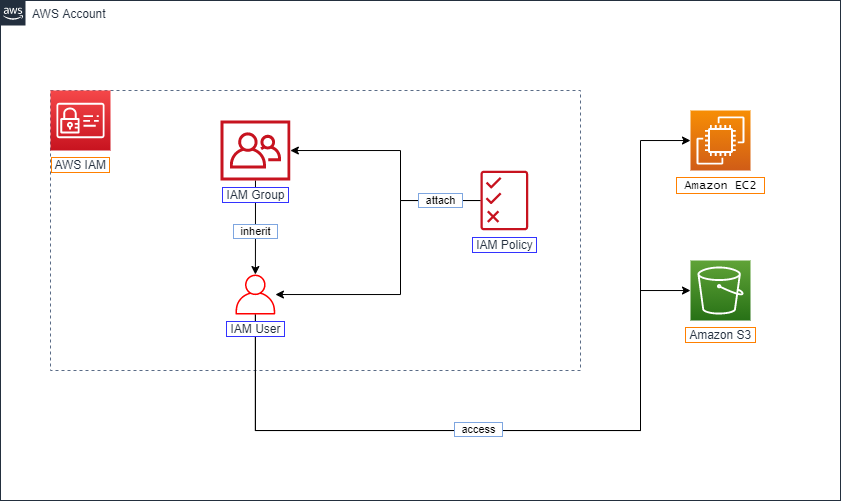
IAM Group and IAM User
Understanding IAM Groups and Users
ℹ️ Overview AWS Identity and Access Management (IAM) provides two core components for access management:
- IAM Groups for organizing and managing collections of users
- IAM Users for individual identities within your AWS account
IAM Groups
ℹ️ What is an IAM Group? An IAM Group is a management feature that allows you to:
- Organize multiple IAM users into collections
- Apply permissions to entire groups of users at once
- Simplify access management through centralized control
💡 Pro Tip Use IAM Groups to implement role-based access control (RBAC) by creating groups that align with job functions or teams in your organization
IAM Users
ℹ️ What is an IAM User? An IAM User represents an individual or service identity that can:
- Access your AWS account and resources
- Have unique security credentials
- Be assigned direct permissions or inherit them from groups
⚠️ Important Note When first creating an AWS account, you sign in as the root user. However:
- The root user has complete access to all AWS services and resources
- You should create individual IAM users for day-to-day operations
- Root user access should be strictly limited to specific account and service tasks
🔒 Security Note Follow security best practices by:
- Creating individual IAM users for each person needing access
- Assigning users to appropriate groups based on job function
- Implementing the principle of least privilege through group permissions